

Tips to Provide the Best Website Experience, Page 24 of 25
Discover expert articles on website optimization, security, speed, and content management from Contensive. Learn strategies for building better web experiences.
Google Introduces All New "Google Maps"
At the Google I/O conference today, Google introduced a bunch of new products and product roll-outs including Google Maps, a new music service, updates to Google + and a new look and features for one of the most popular Google products Google Maps. Below is an excerpt from an article by Nathan Oliveras-Giles for the Verge (you can read full article here).
Google Maps on the desktop has been rebuilt from the ground up, ushering in its most significant changes since its launch eight years ago. After spending some time with the new Maps, and with its lead designer, we’re struck by Google’s choice to do away with most of the user interface elements and let the map reach from edge to edge in your browser. A lone search box in the upper left gives you access to Maps’ features, as does clicking on elements within the map. Google has integrated Google Now’s card metaphor to present information from a newly built-in version of Google Earth, reviews from Zagat and Google+, Street View, and directions. And new user interface tweaks surface locations and transit routes before you even search for them.
The rebooted Google Maps user interface, which made its public debut at Google I/O today, is a total reimagining of one of Google’s most popular services. The changes are a bit shocking at first — the new Maps looks and works more like a native app than a traditional website. The tiled desktop maps of old have been replaced with cleaner, quicker-loading vector maps. As you type into the search box, predictions show up as they did before, but once you've settled on what you’re looking for, details appear in the Google Now-style information cards.
Rather than solely relying on you searching for a location, the map automatically highlights your work, home, frequently searched-for locations and new places you might be interested in, based on your search history and places your friends have given good reviews. “Larry calls this going from a demand to an assist,” Jonah Jones, Maps’ lead designer, said of CEO Larry Page.
Inbound Marketing for Associations and Non-profits
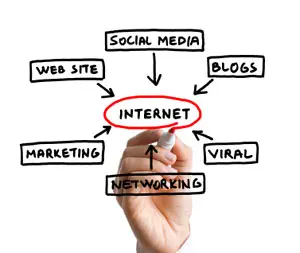
The word marketing is usually associated with profit generating tactics; however, inbound marketing is focused on organic growth and can and should be used by associations and non-profits. The goal is to attract people to your cause or organization based on the relevance of the information you are offering your desired audience, where as outbound marketing consists of communicating to a mass audience and hoping something sticks.
As the Internet and access points continues to expand, so too does the average consumer’s aversion to traditional marketing. With products such as satellite radio and DVR making offline efforts easier to ignore, consumers no longer have to tolerate "interruption" marketing tactics. Consumers now rely on the Internet to do their research on products and services; they actively seek out products and services that they need, rather than passively interact with products outbound marketing platforms point them to.
It is imperative to develop an inbound marketing process that will capitalize on these new trends in consumer behavior. An effective inbound marketing process will provide you with a cheaper, more efficient, and more compelling way to grow traffic, generate leads, convert leads and analyze data in a way that guarantees repeatable, continuous success.
Inbound marketing is made up of many pieces. To truly succeed online, businesses need to have a comprehensive strategy including all the pieces such as:
· Blogging
· Social media engagement
· Search engine optimization (SEO)
· Landing pages
· Email marketing
· Video marketing
· Strategic website design.
an effective marketing website should be generating leads on a consistent basis, and second,if a site does in fact generate leads, the rate at which leads are generated should be improving each month. With that said, a good website allows for almost total trackability, which means most campaigns are instantly measurable. This allows for easy replication of success and fast learning from mistakes.
FaceBook rolls out new Photo Sync App
Facebook is rolling out a new app called Photo Sync that when users user enable the app, every photo they take on their mobile device gets automatically uploaded to their Facebook account. The photos are saved to a private folder that you can choose which photos to share and caption. But this makes uploading photos infinitely easier from a user's perspective. All of the new photos also allow Facebook to access and use them for data-mining purposes.
Facebook was already taking in 300 million photos a day, and that rate is about to dramatically increase. It’s now ushering users onto its background uploads feature Photo Sync with a big banner at the top of its mobile apps’ news feed. Just two taps and your last 20 photos plus every one you take in the future are auto-uploaded to a private album from which you can share and Facebook can mine metadata.
Below is an excerpt from Josh Constine's blog post about Photo Sync on Tech Crunch.
"The Roll out of Photo Synch that started yesterday is perhaps the biggest thing to happen to Facebook photos beyond friend tagging and manual mobile uploads. Friend tagging jump started Facebook’s growth with a jolt of narcissism over a half decade ago. If someone tagged you in a photo, you likely checked it out the second you got the notification, along with all the other photos in the album. Later it began offering photo sharing from mobile, but its biggest problem remained the arduous upload process...You’ll see the full force of Photo Sync if Facebook combines it with its facial recognition feature. Rather than tagging friends manually, Facebook will analyze your Photo Synced album for the mugs of friends, apply tags automatically, and all you’ll have to do is approve them.
In the meantime, Facebook is probably going to suck in some terms of service violations and other very private photos. Even if people know that no one else can see them, some might panic when they see photos of them drunk, sloppy, nude, or in otherwise compromising positions within the Facebook Chrome. Right now Facebook doesn’t do a great job of explaining how the feature works so it could cause some to be caught by surprise, freak out, and turn it off.
But that’s probably worth it to Facebook because of the immense amount of photo metadata Photo Sync will give it...the feature is essentially Facebook’s entrance into cloud storage. While you might not share all the photos you upload, Facebook can still pull out geolocation to help it figure out where you are now and what local business ads to show you.. Eventually, brand recognition like the ability to identify Nike shoes in your photos could aid ad targeting too."
You can read the full blog post by Josh Constine here.
Spice up your next fundraiser with a little friendly competition

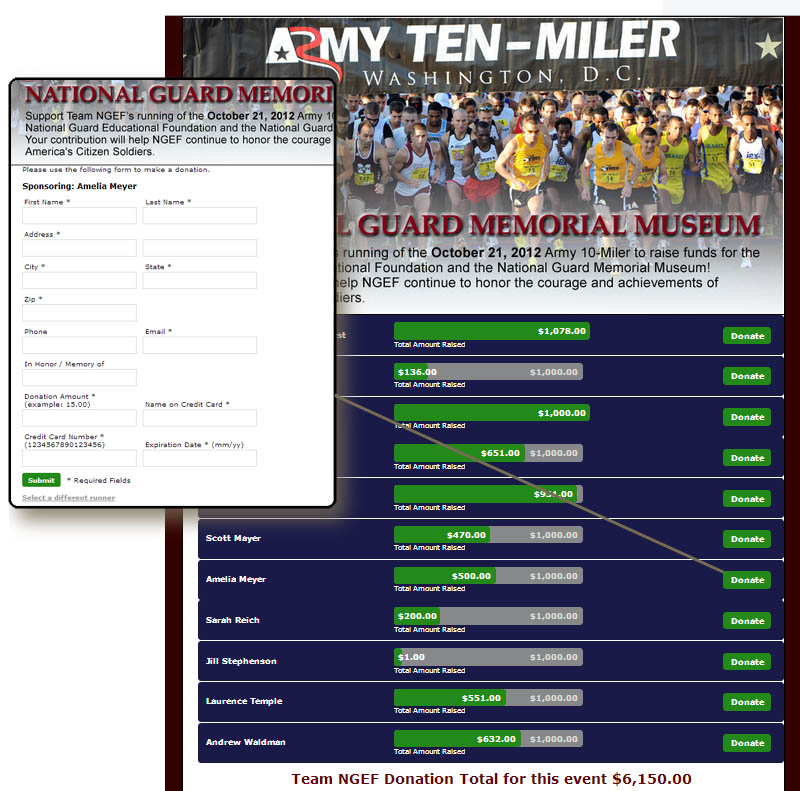
The National Guard Educational Foundation, is a non-profit organization dedicated to the telling of the National Guard rich heritage and the continuing contributions of the National Guard of the United States. One of the main vehicles for this mission is the National Guard Museum in Downtown Washington DC. The NGEF relies solely on charitable contributions for its funding.
If you want to use some of the cool add-ons within Contensive, give us a call and we’ll show you how to spice up your next fundraiser.
Google's Online Ad Revenue Vs. Print Media
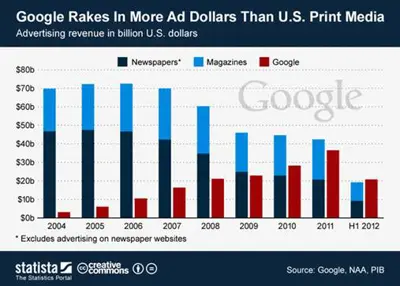
Just saw a news blurb from Statista, that illustrates the meteoric rise of online advertising. In the first 6 months of this year Google generated over 20 billion (that's billion with a "b") dollars in advertising revenue. Compare that to just under 20 billion for the entire U.S. print media industry (that's all newspapers and magazines). Some of the younger set might not remember but it wasn't but 10 years ago web sites were begging people buy banner ads and some advertising pundits were saying this internet thing will never catch on. What an amazing time we live in.
Make Your Web Site Mobile Friendly
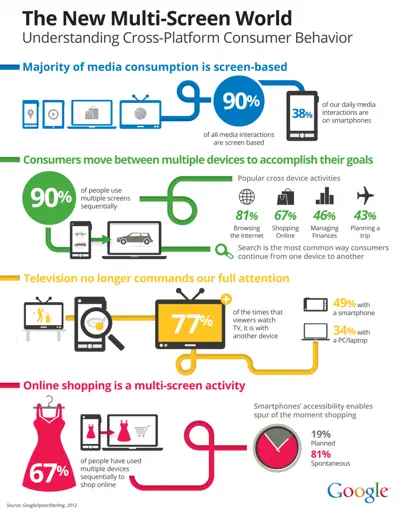
Unless you’ve been living under a rock with no Internet access, you’re probably well aware of the prevalence of mobile devices like iPads, iPhones, and Androids. In addition to the increased use of mobile devices, there’s also the change in behavior. More and more people are engaging across multiple access points.
Facebook revealed 600 million users now access Facebook from a mobile device. Furthermore, a significant portion of these mobile users don’t view the social network from both mobile and desktop. Many view it just from the desktop, but there is also a growing number that only view it from mobile (102 million users, or 10.68 %). Back in July, when Facebook revealed the 543 million mobile and the 955 million total numbers, mobile consisted of 56.86 percent of the company’s total members. That number has been steadily growing with each update.
So, if you’re still reading this then I’m sure you feel the pressure to go mobile. The first thing you should do is open up Google Analytics and look at the “Devices” report under “Mobile”. This will show you which mobile devices people are using to access your site. Take a look at how your website renders on these devices and decide if you need to make any changes. You want a website that users won’t need to pinch, tap, or squint in order to view.
Three Steps to Developing a Mobile Presence
1. Have A Clear Objective
Understand the how users will engage with your site on mobile, beyond readability.
Ask yourself if a mobile user would have different needs than someone accessing your site through a browser.
Think about proximity, location and ease-of-use. For example, a person attending your site for charity walk might want to have to have start times, or GPS layout for the course. Attendees to your annual meeting want to access their itinerary for workshops and sessions with alerts and locations as they are about to start.
2. Choose Your Mobile Option
Create a Mobile Site – Creating a mobile site means creating a completely separate website for mobile devices. The great thing about creating a separate mobile site is the user experience. Because the site is designed for specific dimensions, the content will be easy to view and interact with. The downside is the expense and work.
However, if you use Contensive, you can utilize mobile templates and a module called MobileView , to automatically render a mobile site, and allows you to select which pages to display on mobile devices and which pages to hide and you won’t have to duplicate content creation efforts.
Create a Mobile App – A mobile app that contains your website content can create even a better user experience then a mobile site. Users can access your content off-line, integrate location features, and receive push notifications for any updates. The downside of a mobile app is the cost and maintenance.
Create a Flexible Width Website – This is the easiest and cheapest approach to creating a responsive website. This website uses the flexible with approach, meaning that it automatically resizes itself in response to the device. The downside is you get what you pay for and more often than even with fluid sizing the content isn’t going to work or look right.
 3. Test, Test,
Test
3. Test, Test,
Test
You certainly want to test your mobile site before launch, but you also want to test after. The reason why is that you have very little information for how people will actually use your mobile website. Testing your mobile sites after they go live will help you improve it much faster.
Leading Edge Content or Back To The Future?
 |
I recently received an email from one of our content manager clients whom I would describe as a "Power User". They are very in-tune with the Contensive ACMS tools and try to take full advantage of the system. She wrote that she had recently seen a video demonstration on a portal product that had a "nifty" feature that she thought we may want to include in Contensive.
FaceBook Tests Pintrest-like Functionality
Looks like Pintrest has peaked the interest of Facebook. Facebook has announced that they will begin testing a new feature called "Collections". Facebook claims the new feature is unrelated to the popular pinning site, but it does sound like they are trying to push back at Pintrest. Below is an excerpt from an article on TechCrunch.
Facebook has just begun testing “Collections” — a new feature it says is “unrelated” to Pinterest but could be a competitor. It allows retailers to add “Want” or “Collect” buttons to news feed posts about products. These save and share products to a “Wishlist” on user profiles that host a “Buy” button that can be clicked through to make purchases offsite.Seven retail partners including Pottery Barn and Fab can now share Collections posts to their fans.
Collections could help retailers score viral click-throughs to their product pages by making things their fans are interested in more discoverable to friends. Facebook isn’t earning affiliate fees on Collections click throughs, but it could get brands to buy ads to get more fans.
To try out Collections, Like the Pottery Barn Page then visit this link to its first Collections post. You’ll then be able to add products to your Collections and see the product pages complete with Buy buttons.
Facebook told us this about the product:
“We’ve seen that businesses often use Pages to share information about their products through photo albums. Today, we are beginning a small test in which a few select businesses will be able to share information about their products through a feature called Collections. Collections can be discovered in News Feed, and people will be able to engage with these collections and share things they are interested in with their friends. People can click through and buy these items off of Facebook.”....