

Tips to Provide the Best Website Experience, Page 23 of 25
Discover expert articles on website optimization, security, speed, and content management from Contensive. Learn strategies for building better web experiences.
Website Development: Best Practices

Productive best practices are about developing efficient, collaborative behaviors, not about micro-managing activities. Minimal requirements give great people the freedom to do great work. The work will never be great if you force everyone down the path of the least common denominator.
- Compartmentalizing stops the thrill of stress and failure.
The big-brained developer who loves to keep a dozen balls in the air at once is no smarter than the organized developer who can handle fifty? Divide and conquer. - Force yourself to care about security today, not tomorrow.
To say something will probably never happen just means you want to wait until it blows up to deal with it, and by then it's too late. Consider the consequences and act appropriately - Don't take risks and give away the rewards.
If your costs don’t include testing, security checks, load balancing, backups, redundancy, etc. you have to explain that upfront. Otherwise your client benefits from the lower cost, but still blames you for the crash. - Develop for the next developer.
Developing a project is the first step. Managing its life-cycle is much bigger. If you develop a house-of-cards, no matter how pretty it is, turn and run. - Don't add anything to your best practices that you are not serious about.
When the list gets too long to memorize, it is too long to review. Move it from your virtual trash (where you just ignore it) to the physical trash. - Expect clients to know very little about what they want. Expect the client’s users to know way less.
It will never be the client’s fault when it does not work, or that it is too complicated for the user. Every client knows that. If you accept it upfront and take on the responsibility, you will too. - Everyone is responsible for quality.
You may know your part works fine, but it will end up in the trash bolted to the parts you didn't think would affect you. - Everyone develops iteratively, one pinch at a time.
No one ever sees the whole project from the beginning. Allowing time for change makes it easier to accept. The converse does not prevent it. - The cost of a project includes both bugging and debugging.
Everyone makes mistakes. Plan as many hours on QA as development. Going live without debugging is just denial and will be more difficult to charge.
It’s A Mobile, Mobile, Mobile, Mobile, World

Let me start this blog by throwing a few statistics at you:
-
58% of all US consumers already own a smartphone (and the percentage is growing)
-
Over 1.2 billion people access the web from their mobile device
-
Globally mobile accounts for 15% of all internet traffic.
-
Over 95% of smartphone users have searched for local information
and finally....
According to Google, "Smartphone users are a significant and fast-growing segment of internet users, and at Google we want them to experience the full richness of the web".
That is why Google has implemented changes into their search algorithms that will prioritize mobile -optimized sites in searches performed by mobile devices. That of course means sites that are not optimized will be demoted in their rankings.
At Contensive when Google speaks we listen, and based on their recommendations, we have embraced the responsive design methodology when we develop new web applications and websites.
We recommend using responsive web design because it has many good aspects:
Using a single URL for a piece of content makes it easier for your users to interact with, share, and link to your content, and a single URL for the content helps Google's algorithms assign the indexing properties for the content.
No redirection is needed for users to get to the device-optimized view, which reduces loading time. Also, user agent-based redirection is error-prone and can degrade your site's user experience.
It saves resources for both your site and Google's crawlers. For responsive web design pages, any Googlebot user agents needs to crawl your pages once, as opposed to crawling multiple times with different user agents, to retrieve your content. This improvement in crawling efficiency can indirectly help Google index more of the site's contents and keep it appropriately fresh.
Other benefits of responsive web design is that it delivers the same content pages from your current Contensive framework, so you don't have to manage two platforms. Also, if you are happy with your current design you don't have to start over to implement mobile, we can make the necessary design adjustments in your existing style sheets and templates, so implementation is faster.
If you are ready to talk mobile give us a call 571-291-3416 and we can show you how to quickly and painlessly position your site for the mobile world.
Inbound Marketing and Social Media

With nearly two billion users world wide, the social media network is not just for teens and those with avid social lives. Clever inbound marketers have picked up on this gold mine of potential customers, and are using social networks like Facebook and Twitter to their advantage. In 2007, Facebook boasted a whopping 100,000 business pages in its social network. Marketing on Facebook wasn't a necessity for lead generation. This year, Facebook's Director of Small Business, Dan Levy, announced Facebook's recent milestone of having 15 million business pages. In 2006 we had the emergence of Twitter, bringing the social network and real-time information closer together. Twitter now has over 200 million active users posting about 4 million tweets per day. With these numbers constantly rising, why wouldn't marketers want in on this easy, effective strategy for increasing demographics? Businesses have the potential of using networks like Twitter for marketing, funneling leads and customer service, not just advertisement.
We know we can use social media for extending our customer basis, but why should we? Some call it the end of civilization as a whole, but the social media path is the direction business is headed. Customers have more consumer information readily available to them, and we want to be in the forefront of their inquiries. We can do this by staying current with social media and expanding the way we network to get new leads. As soon as I post this blog you can bet your bottom dollar that there will be links to my blog on inbound marketing on all of our Contensive social media pages, and if all goes to plan, this will aid us in generating new leads. This is the coming of age for social media, so why not use it to our advantage instead of the more traditional approach to marketing.
Meghann Kinshella
10/29/13
Sources:
"Twitter Taking Business To New Heights"; Meghan Lison; http://www.cnbc.com/id/100940209
"Social Networking Reaches Nearly One In Four Around the World"; http://www.emarketer.com/Article/Social-Networking-Reaches-Nearly-One-Four-Around-World/1009976
"The Ultimate History Of Facebook"; Daniel Zeevi; http://socialmediatoday.com/daniel-zeevi/1251026/ultimate-history-facebook-infographic
"Facebook: 15 Million Businesses, Companies, And Organizations Now Have A Facebook Page"; John Koetsier; http://venturebeat.com/2013/03/05/facebook-15-million-businesses-companies-and-organizations-now-have-a-facebook-page/
"Social Media Cake"; http://www.flickr.com/photos/loveyourcake/with/7323348150/
PPC Marketing: 3 common mistakes Advertisers make using Google Adwords
Content Marketing Strategy for inbound marketing and lead generation
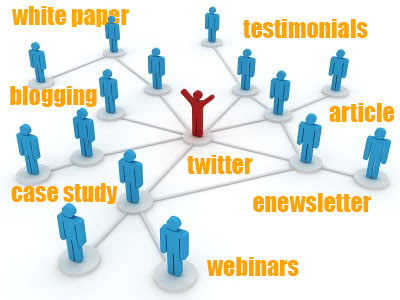 All organizations need to position themselves and convince customers that they are the informational resources in their particular niche. The best way to achieve that goal is by creating engaging targeted content for your audience. Content marketing is any marketing format that involves the creation and sharing of content in order to acquire customers.
- Blog
- Enewsletter
- White Paper
- Article
- eBook
- Case Study
- Testimonials
- Microblogging (i.e., Twitter)
- Webinar/Webcast
- Video
'Contensive Cares' Program-- builds application for non-profit group providing computers to low-income and disabled
 Phoenix computers is a nonprofit organization based in Rockville
Maryland that takes donated computer equipment and then tests, runs diagnostics
and upgrades on those computers. The computers are then redistributed at low
cost to low-
Phoenix computers is a nonprofit organization based in Rockville
Maryland that takes donated computer equipment and then tests, runs diagnostics
and upgrades on those computers. The computers are then redistributed at low
cost to low- income
and disabled individuals and families as well as non- profit,
educational, religion-based, and charitable organizations
that work with low and moderate income families.
income
and disabled individuals and families as well as non- profit,
educational, religion-based, and charitable organizations
that work with low and moderate income families.
Phoenix is an all-volunteer organization, and one of those
volunteers, Jim Smith, is a now retired
client of ours who worked at Toll Brothers.
Jim called us up and asked if we could help him make their process more
efficient. We of course said yes.
Phoenix does not distribute directly to the public due to
their licensing arrangements with Microsoft.
Instead potential clients are vetted by other non-profit organizations or
government agencies which refer their clients to us to obtain a computer.
Jim wanted to set up an online registration for those
organizations so they could log in and fill out the appropriate paperwork for
the client. When done the system would
generate a PDF that that “buyer” then takes to Phoenix who can quickly scan the
barcode on the PDF pull up the requested order and complete the transaction.
“Before we were doing everything by hand and the process was
prone to errors including not correctly inputting the MS software license keys.
Now we simply scan the PDF add any check the boxes for any additionals and the
system generates a total and saves everything to the DB including the license
information.” says Jim Smith. “This saves us a lot of time”.
It is estimated that every week more than 16 tons of
computer
equipment is thrown into local landfills. By
donating
equipment to Phoenix Computers for reuse instead
of
throwing it in the trash, you or your business supports
green
initiatives and at the same time help others in the
community. Because
Phoenix Computerssm is a 501(c)(3) non-profit organization,
your donations may be tax-deductible.
Contensive Cares is a program that we started to help out
community-based causes by providing low cost and in many cases no-cost web
development and support services. If you would like more information about
Contensive Cares email us at info@contensive.com.
If you would like more information about Phoenix Computers
or to find out how you can donate your old equipment email PhoenixComputers.Questions@gmail.com,
or visit their website www.phoenixcomputers.info.
Contensive is a leading provider of Website Form, Function
and Process Development including services like; Website Design and Technology
Modernization; Mobile Website and App Development; Online Application
Development; Search Engine Optimization and Ongoing Content Maintenance for
Businesses and Associations.
Internet Trends

- Advertisers money is out of sync with audience. There’s a huge gap between the amount of time people spend on mobile devices and the amount of advertising budgets directed at mobile. Mobile takes up 12% of our time, but gets only 3% of ad budgets. Print media is the opposite, getting 6% of our time but pulling in 23% of the ad dollars.
- 8 out of 10 of the top internet sites are from the US but more than 80% of their audience is outside the US.
- Google+ is doing better than you think. It’s now the #4 social media site, behind Facebook, YouTube and Twitter. And it’s closing in on Twitter.
- Mobile keeps booming. Mobile traffic represents 15% of all the internet traffic, versus less than 1 percent in May 2009. By this time next year mobile could approach 25% of internet traffic.
- More than 500 million photos are uploaded and shared on Flickr, Snapchat, Instagram, and Facebook each day.
Framework Updates for May 21, 2013
This is a quick list of tweaks that might affect or inspire you. Feel free to contact support@contensive.com or Dwayne@contensive.com with any questions or comments.
Search Engine Site Map
The search engine sitemap addon automatically and continuously submits pages on your site to search engines like Google. There is no setup, you just install it.
This week's changes add two new sets of links
- links to pages that are not on any menu and not displayed as child pages (excluding those marked as blocked)
- links to pages created within addons, like the detail page of every blog post.
Newsletter Addon Rewrite
The newsletter addon creates an online newsletter with issues, articles, article categories, archives, group-based article permissions and an automatic email.
This past month we have re-written a new newsletter addon (called "Newsletter 2" in the Addon Library). The primary change is to convert the html and stylesheets so they can be easily accommodate the horrendous limitations of email platforms. New sites will use it exclusively. Current sites will need to manually upgrade.
Ecommerce Online Checks
The ecommerce collection creates an account invoicing system on which all payment related addons will be based. It uses all major payment processors and includes online charges as well as automated recurring charges, invoicing, account statement and an online My Account page.
This week we added online echecks and primary/secondary payment preferences.
Membership Manager Reports
The membership manager collection creates a membership account system tracking multiple organizations and people per account. It uses the ecommerce collection to automate billing.
We added four reports with Pie and Bar Charts; Memberships By Type, Expirations by Month, Expirations by Membership Type, Renewals by Month.