

Ctrl-Alt-Health, Page 2 of 7
Reboot your digital practice
Welcome to Ctrl-Alt-Health, the Contensive blog where healthcare meets digital innovation. We help medical practices take control, reset what’s not working, and optimize their online presence to attract and retain more patients. From website design and SEO to patient experience and automation, Ctrl Alt Health delivers practical insights for running a healthy, high-performing digital practice.
Title Tags: The Search Result You're Handing Google to Write for You
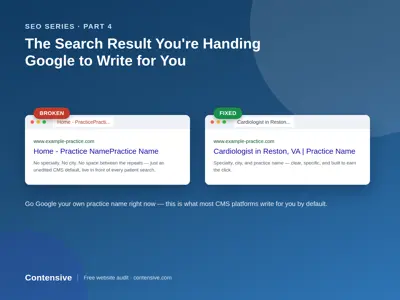
Go ahead — open a new tab and Google your own practice's name right now. Look closely at that bold blue line above the URL.
We did this recently while auditing a cardiology practice's website, and here's what came up: "Home - [Practice Name][Practice Name]" — the practice name, run together twice, with no space between them, no city, and no specialty. No one wrote that on purpose. It's what happens when a website platform is left to generate a title automatically, and nobody ever went in and set it.
That one line is one of the most overlooked pieces of real estate a medical practice owns online — and it's often the first thing a prospective patient sees before they ever land on the site.
What a title tag actually is
A title tag is the line of text that shows up in three places at once:
- The bold, clickable headline in a Google search result
- The text on the browser tab when the page is open
- The preview text when the page link is shared or bookmarked
Behind the scenes, it's a single line of HTML (`Your Title Here`) that lives in the page's code, invisible on the page itself. Most website platforms will generate one automatically if a practice never sets it manually — usually by stitching together the page name and the site name. That's exactly how the duplication above happened: an automatic default nobody replaced.
Why it's worth fixing
Google uses the title tag as a strong signal for what a page is about and who it should show it to. A generic, duplicated, or missing title tag makes it harder for Google to understand — and rank — a page for the searches that actually matter, like "[specialty] near me" or "[specialty] in [city]."
It also affects something more immediate: click-through rate. A patient scanning a page of search results is deciding, in about two seconds, which result to click. A title tag that's broken, repetitive, or generic (just "Home" or the practice name with nothing else) gives them nothing to click on — even if the practice would have been a great fit.
What a good title tag looks like
A strong title tag for a medical practice page typically includes three things:
- The specialty or service — what the page is actually about
- The city or service area — where the practice is, matching how patients actually search
- The practice name — for recognition and trust
All of that fits comfortably in roughly 50–60 characters, which is about the point where Google starts truncating the display with "...". A homepage title following this pattern might read something like: "Cardiologist in [City] | [Practice Name]" — specific, readable, and free of duplication.
How to check your own
This takes about ten seconds, no login required:
- Look at the browser tab while the page is open — that's the title tag, right there.
- Check the Google search result for the page (search the practice name, or "[specialty] [city]").
- View page source: right-click anywhere on the page, choose "View Page Source" (or Inspect), and search for ``.
Do this for the homepage first, then for any specialty or service pages. It's common to find the same broken pattern repeated across every page on a site — which means it's usually a one-time fix at the template level, not a page-by-page rewrite.
The bigger picture
Title tags rarely travel alone. In this same round of audits, the practices with duplicated or missing title tags also tended to have incomplete schema markup, inconsistent NAP (name, address, phone) listings, or a booking button that was harder to find than it should be — the exact issues covered earlier in this series. A broken title tag is often the most visible symptom of a site that hasn't had a technical once-over in a while.
The good news: it's also one of the easiest things to fix, once it's been found.
Request your free website audit →
We'll check your title tags alongside schema markup, NAP consistency, and your booking path — no cost, no obligation.
"Book Online" Buttons That Don't Book Anything
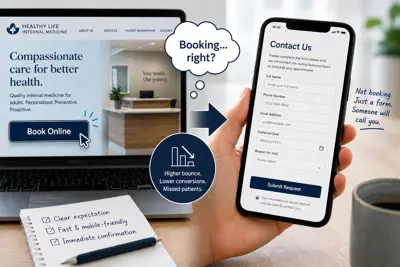
Click "Book Online" on most local practice websites, and here's what actually happens: a contact form opens. Not a calendar. Not a time slot. A form that says, in effect, "leave your information and someone will call you during business hours to actually schedule this."
That's not a design nitpick. It's a mislabeled button — and mislabeled buttons carry a cost that shows up in analytics most practices never look at closely enough to notice.
What we measured, not just observed
In our audit of 80 local practices, more than 8 in 10 offered no true online scheduling. The most common pattern was exactly the one above: a button labeled "Book Online" or "Request Appointment" that led to a static contact form with no calendar, no time-slot selection, and no immediate confirmation of anything beyond "we received this."
From a pure UX standpoint, that's a broken promise at the exact moment of highest intent — the two or three seconds after a visitor decides to try you. From an SEO and analytics standpoint, it's worse than it looks, for a specific reason: a booking action that dead-ends into a generic form produces weak engagement signals. Time-on-page drops, bounce rates on the booking step climb, and the interaction never completes in a way that search engines or your own analytics can register as a successful conversion. You can be doing everything else right — fast site, clean schema, strong reviews — and still be quietly penalized by a booking flow that never finishes what it promised.
The gap between "says booking" and "does booking"
A form isn't nothing. It's meaningfully better than a phone number alone, and we've written about what a missed after-hours request actually costs a practice over time. But a button that visually promises real-time booking and delivers a contact form creates a specific kind of friction: the patient feels the small bait-and-switch, even if they can't articulate why, and practices competing for that same patient increasingly offer the real thing.
The fix isn't necessarily full self-service scheduling into your live calendar — plenty of practices have valid reasons not to open their schedule directly to strangers. The fix is honesty in the interface: label the button for what it does ("Request an Appointment" instead of "Book Online" when it's a request form), and make the request path itself fast, mobile-friendly, and immediately confirmed, so the interaction at least completes cleanly even if a human still does the final scheduling.
What this costs beyond the immediate patient
Every dead-end booking interaction is a data point search engines use to judge how well your site serves the intent it's ranking for. A pattern of visitors clicking a booking button and leaving quickly reads, in aggregate, as a page that didn't deliver on its promise — which can quietly work against you in exactly the local-search competition this whole SEO series has been about. NAP consistency and schema markup get you found. A booking flow that actually completes is what convinces Google — and the patient — that finding you was worth it.
What to check on your own site
Click your own "Book Online" or "Request Appointment" button right now, on a phone, the way a patient would. Ask three questions: Does it feel like booking, or does it feel like filling out a form and hoping? Does it confirm anything before you close the page? Would a stranger, mid-search, trust that this practice will actually call back?
Find out what your booking path is actually doing
Our free audit checks your booking flow alongside NAP consistency, schema markup, and site speed — the same complete pass, free either way, whether you work with us or not.
What Schema Markup Actually Tells Google About Your Practice
Two internal medicine practices sit three blocks apart. Same specialty, similar review counts, similar-quality websites to a human eye. Search "internal medicine doctor" in their town, and only one shows up in the map pack. The other is a click deeper, and most patients never make that second click.
The difference usually isn't content, design, or even backlinks. Often, it's a few lines of code neither practice owner has ever seen: schema markup.
The part of your website search engines can't guess
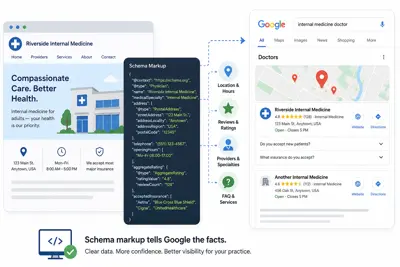
Schema markup is structured data — a standardized way of labeling the facts on your page (your practice type, specialties, hours, address, accepted insurance, individual providers) so that search engines don't have to infer them from surrounding text. Without it, Google is reading your homepage the way a skimming stranger would: picking up the gist, occasionally getting a detail wrong, and sometimes missing something entirely.
In our audit of 80 local practices, we found that sites without schema markup were also the sites Google seemed least confident about — inconsistent search snippets, missing map-pack appearances despite decent reviews, and search results that undersold what the practice actually offered. Map Pack placement specifically depends on a combination of factors Google weighs together: your Google Business Profile completeness, how consistent your listings are across the web (see last week's post on NAP consistency), and structured on-page data that confirms what your profile claims. Schema is the piece that lives entirely on your own site, under your own control.
What good schema actually covers for a medical practice
For a small practice, the relevant schema types are narrower than they sound:
- Medical Business / Physician schema — identifies your practice type, specialty, and individual providers explicitly, rather than leaving Google to infer "internal medicine" from body text that might just mention it once.
- Hours and location data — structured, not just written in a paragraph — so hours display accurately in search results and voice/AI answers, and update correctly if you ever change them.
- Reviews and aggregate rating markup — when implemented correctly, this is part of what lets star ratings display directly in search results, which measurably affects click-through before a patient ever reaches your site.
- FAQ and service markup — turns common questions ("Do you accept new patients?" "Do you take my insurance?") into content Google can extract and display directly, sometimes without the patient even clicking through.
None of this is exotic. It's also not something a practice manager typically has reason to know exists, because nothing about running a medical practice ever surfaces it — until a competitor with it in place quietly outranks you for months.
The AI-visibility connection, briefly
We've written before about what AI assistants say when a patient asks them for a recommendation. Structured data is part of how those systems read your site cleanly instead of guessing. It's not the whole answer — your GBP and directory consistency matter just as much — but a site with clear schema gives any system reading it, human search engine or AI assistant, less room to get your practice wrong.
Checking your own site
You don't need to read code to get a rough answer. Google's Rich Results Test (a free tool at search.google.com/test/rich-results) will show you exactly what structured data, if any, Google can currently read from your homepage. If the tool comes back empty or shows only generic website markup with nothing specific to your practice, that's your answer.
Find out what Google can actually read on your site
Our free audit checks your schema markup alongside speed, booking path, NAP consistency, and what AI assistants say about your practice — the same full pass we run for every practice, free either way.
NAP Consistency: The Directory Error That Confuses Google and Patients
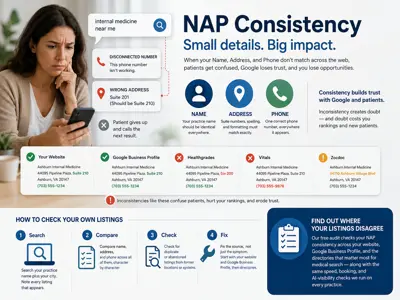
A patient in Ashburn searches "internal medicine near me." Google shows her a practice — but the phone number in the listing rings a disconnected line. She tries the address instead. It's a suite number off by one digit from a listing on a different directory. She gives up and calls the next result.
Nobody at that practice did anything wrong, medically or otherwise. The problem is smaller and more mechanical than that, and it's more common than most practice owners assume.
What "NAP" actually means, and why Google cares
NAP stands for Name, Address, Phone — the three facts that identify your practice everywhere it appears online: your website, your Google Business Profile, Healthgrades, Vitals, Zocdoc, insurance directories, even old citations nobody remembers creating. Google uses agreement across these listings as a trust signal. When they match exactly, Google treats your practice as a stable, verifiable business. When they don't, Google has to guess which version is current — and it often hedges by ranking you lower or leaving you out of the map pack entirely.
Patients read the same inconsistency as a red flag, just faster and less analytically. An address that doesn't match, or two different phone numbers across the first two search results, reads as "this business might not be reliable" before a patient has any other information about the practice at all.
What we actually found
In our audit of 80 local practices, this wasn't a rare glitch. Two physician practices had no findable website at all — including one office where a second provider listed at the exact same address did have a working site, meaning a patient (or an AI assistant) searching for the first provider's name found nothing, while the practice next door in the same suite was fully visible. That's not a ranking problem. That's a patient who typed a real name into a real search box and came up empty.
Add outdated citations, practices still listed at a former address, and directories with stale phone numbers from a prior front-desk system, and the pattern holds across specialties: the practice itself is fine. The version of it that search engines and patients can find is not.
Why this is worse for medical practices specifically
A wrong NAP detail at a retail store is an inconvenience. At a medical practice, it's the difference between a patient reaching your office and reaching voicemail at a wrong number, or driving to an address that isn't yours. Trust erodes fast in healthcare search — patients comparing providers treat any inconsistency as informative about the whole practice, not just the listing.
It also compounds with something we've written about before: AI assistants read across all of these sources when answering a patient's question about your practice. A confused set of directory listings doesn't just confuse Google's ranking — it makes it more likely an AI assistant gives a wrong or hedged answer, because it's synthesizing from sources that disagree with each other.
How to check your own listings
This takes about ten minutes and needs no tools beyond a search engine:
1. Search your practice name plus your city. Note every listing that appears — your site, GBP, any directory.
2. Compare name, address, and phone across all of them, character by character. "Suite 200" and "Ste 200" read the same to a person and differently to some systems — but the bigger risks are the ones a person would also catch: a stale suite number, an old area code, a former address that never got updated everywhere.
3. Check for duplicate or abandoned listings — a GBP profile from a former location, an old citation from a directory you forgot existed.
4. Fix the source, not just the symptom. Update your website and GBP first, since those carry the most weight, then work through directories in order of how much traffic they actually send you.
None of this is difficult individually. It's tedious, easy to deprioritize, and the kind of thing that drifts out of sync every time a practice moves suites, changes a phone system, or adds a provider — which is exactly why it rarely gets done.
Find out where your listings disagree
Our free audit checks your NAP consistency across your website, Google Business Profile, and the directories that matter most for medical search — along with the same speed, booking, and AI-visibility checks we run on every practice.